
type
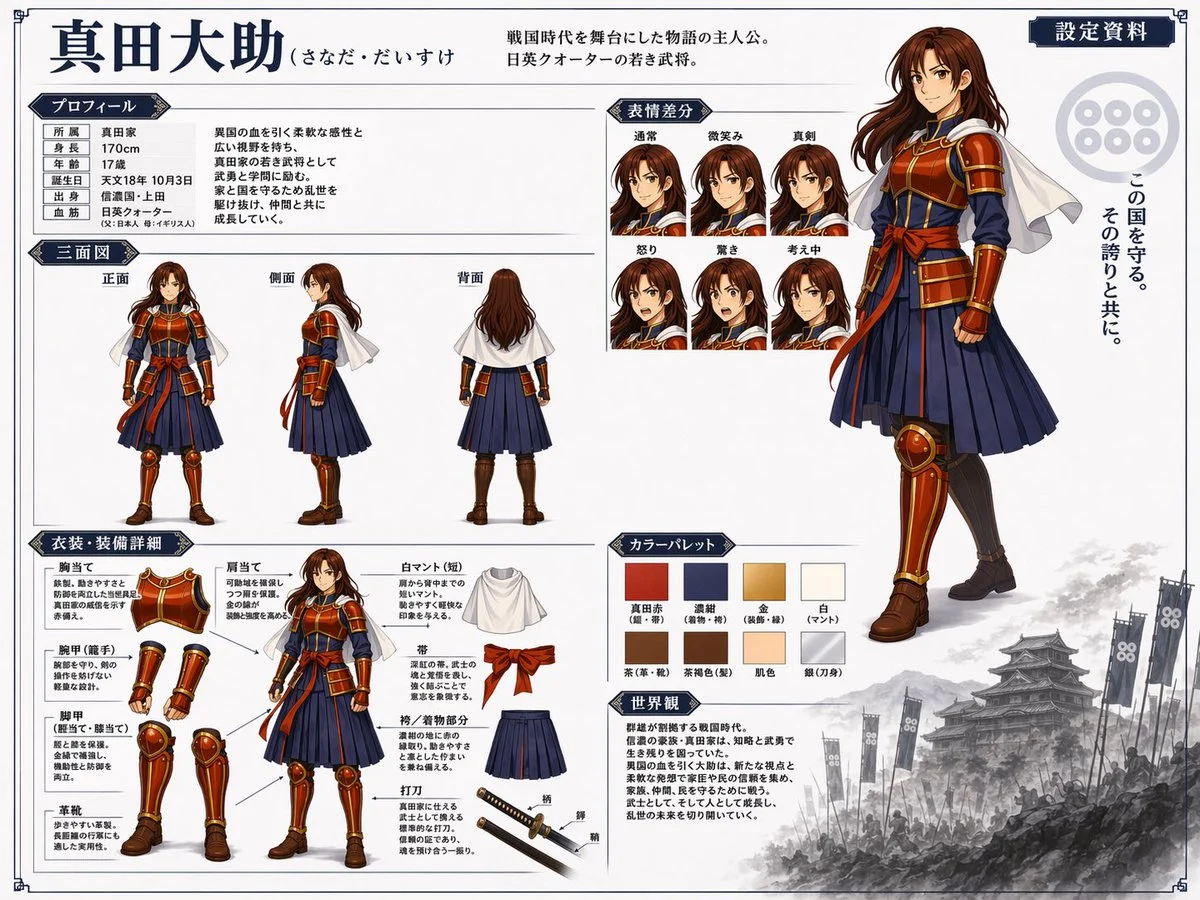
Illustration artistic creation picture - GPT-Image2 industrial-grade reverse engineering prompt word template.
AI-generated demonstration · #123 · 3D Characters & Figurines · 16/9
Prompt
{
  "type": "anime character reference sheet",
  "character": {
    "name": "{argument name=\"character name\" default=\"真田大助\"}",
    "appearance": "young warrior with long brown hair, wearing samurai-inspired armor, {argument name=\"main color\" default=\"red\"} chest plate and guards, {argument name=\"secondary color\" default=\"navy blue\"} pleated hakama, white short cape"
  },
  "layout": {
    "header": {
      "title": "{argument name=\"character name\" default=\"真田大助\"}",
      "subtitle": "{argument name=\"character concept\" default=\"戦国時代を舞台にした物語の主人公。日英クォーターの若き武将。\"}",
      "badge": "設定資料"
    },
    "right_side": {
      "main_portrait": "large full-body standing pose, confident smile",
      "background_elements": {
        "emblem": "six-coin crest",
        "quote": "{argument name=\"catchphrase\" default=\"この国を守る。その誇りと共に。\"}",
        "scenery": "monochrome Japanese castle with army banners at the bottom right"
      }
    },
    "sections": [
      {
        "title": "プロフィール",
        "position": "top-left",
        "content": "table with 6 rows and descriptive text"
      },
      {
        "title": "三面図",
        "position": "mid-left",
        "count": 3,
        "labels": ["正面", "側面", "背面"]
      },
      {
        "title": "表情差分",
        "position": "top-center",
        "count": 6,
        "labels": ["通常", "微笑み", "真剣", "怒り", "驚き", "考え中"]
      },
      {
        "title": "衣装・装備詳細",
        "position": "bottom-left",
        "count": 9,
        "labels": ["胸当て", "肩当て", "腕甲(籠手)", "脚甲(脛当て・膝当て)", "革靴", "白マント(短)", "帯", "袴/着物部分", "打刀"]
      },
      {
        "title": "カラーパレット",
        "position": "bottom-center",
        "count": 8,
        "labels": ["真田赤", "濃紺", "金", "白", "茶", "茶褐色", "肌色", "銀"]
      },
      {
        "title": "世界観",
        "position": "bottom-center-right",
        "content": "paragraph of text describing the setting"
      }
    ]
  }
}
Style Breakdown
Describe the geometry, material roughness, camera angle, and background independently. Soft contact shadows help a miniature object feel grounded in the scene.
Recommended Parameters / Aspect Ratio
Start with the template aspect ratio 16/9 to preserve the demonstrated framing. Use a standard preview resolution first, then increase output size after the composition works. Model-specific steps and guidance values are not supplied for this example; use your selected provider's defaults and adjust one setting at a time. Results vary between models.
Review Your Result
Check seams, repeated parts, scale consistency, and where the object touches its surface. Remove accidental logos or readable text that was not requested.
Use Case Scenarios
Use the exercise for original collectible concepts, object studies, or product direction boards. Keep the design original and obtain relevant rights before manufacturing or commercial use.
Templates demonstrate visual techniques. They are not evidence of real events or endorsements. Use fictional subjects and authorized materials. Report concerns to [email protected].