
Infographic visualization design
Infographic visualization design - GPT-Image2 industrial-grade reverse engineering prompt word template.
AI-generated demonstration · #270 · 3D Characters & Figurines · 16/9
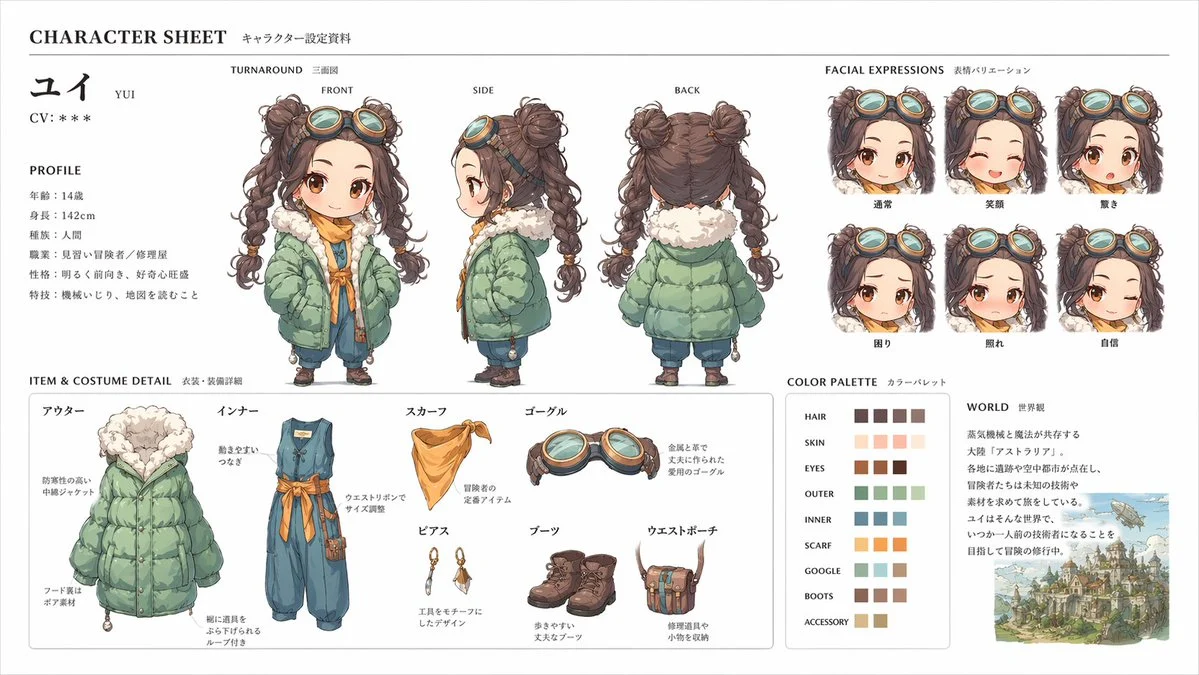
Prompt
[中文]
このキャラクターと背景を元に、 公式設定資料のようなキャラクターシートを作成してください。
・正面、側面、背面の3面図を含める ・キャラクターの表情バリエーションを追加
・衣装や装備の詳細パーツを分解して表示 ・カラーパレットを追加 ・世界観の簡単な説明を入れる
・全体は整理されたレイアウト
(白背景、図解風)
・アスペクト比16:9  ←

高解像度、プロのコンセプトアートスタイル

[English]
Based on this character and background, please create a character sheet like an official setting material.
・Include front, side, and back 3-view drawings ・Add character expression variations
・Disassemble and display detailed parts of costumes and equipment ・Add a color palette ・Include a brief explanation of the world view
・Overall organized layout
(White background, diagrammatic style)
・Aspect ratio 16:9  ←
High resolution, professional concept art style
Style Breakdown
Describe the geometry, material roughness, camera angle, and background independently. Soft contact shadows help a miniature object feel grounded in the scene.
Recommended Parameters / Aspect Ratio
Start with the template aspect ratio 16/9 to preserve the demonstrated framing. Use a standard preview resolution first, then increase output size after the composition works. Model-specific steps and guidance values are not supplied for this example; use your selected provider's defaults and adjust one setting at a time. Results vary between models.
Review Your Result
Check seams, repeated parts, scale consistency, and where the object touches its surface. Remove accidental logos or readable text that was not requested.
Use Case Scenarios
Use the exercise for original collectible concepts, object studies, or product direction boards. Keep the design original and obtain relevant rights before manufacturing or commercial use.
Templates demonstrate visual techniques. They are not evidence of real events or endorsements. Use fictional subjects and authorized materials. Report concerns to [email protected].